
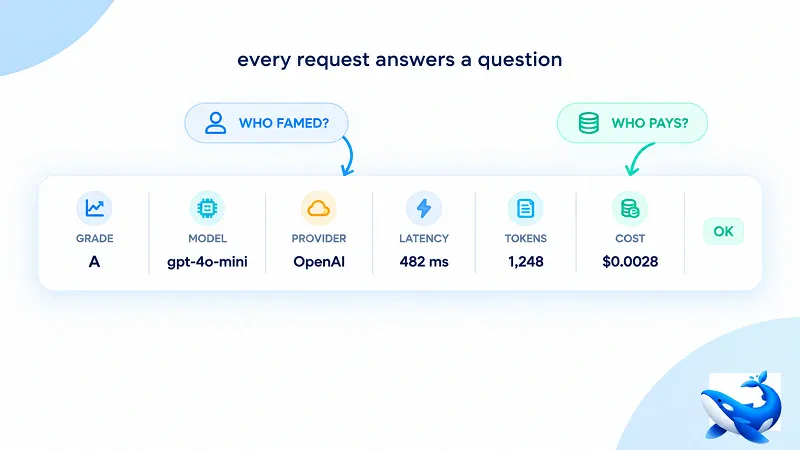
Every gateway keeps logs. That is table stakes, and the request-logs page knows it, which is why the page does not open with the fact that logs exist. It opens with a claim about what they are: a route is never a black box. OrcaRouter puts that sentence at the top of a page describing what request logs keep for every call that crosses the route — not a sample of them.
The page is specific about the record: grade, chosen model, provider, latency, token counts, cost, and why it failed if it did. What it does not say is what those fields are for. That is the part to read into. A log is only as good as the question it can answer, and this one is arranged as answers to questions you have not asked yet — which is exactly what separates a log that settles arguments from a log that just sits in storage.
The record is every request
The page volunteers its own phrase for the coverage: “Not a sample — every request.” [OURS] Sampled logs are fine for dashboards and volume curves; they are useless for debugging and billing, because the one call you need is the one that fell out of the sample. A sampling gateway can tell you how many calls failed and not which ones. An every-request record means the failure you are chasing is in the file, with the request that caused it, in the shape that shows why.
The shape of the record is a row with a fixed set of columns: grade, the model that answered, the provider behind it, latency, tokens in, tokens out and tokens served from cache, the cost of the call, and the failure reason when there was one [OURS]. Each column answers a different kind of question, and that is the design. The same row has to explain a slow response, a wrong answer and a bill at the end of the month. The grade column explains why this prompt went to this model rather than to a cheaper one. The provider column explains why the latency looks the way it does. The cost column explains what the row added to the account.
Whose fault was this failure
The most useful split in the log is the failure column, and it divides the reasons into two buckets: upstream failures, and request-parameter errors that are yours to fix [OURS]. The page is explicit about how the two are handled differently. The parameter bucket breaks errors down by reason, so you can pinpoint the malformed field. The upstream bucket remains a simple count, because a provider having a bad day isn’t something you can fix by inspecting individual errors [OURS]. That asymmetry is the design: one bucket is a list of defects you can fix, the other is a number you can only wait out.
This is the biggest troubleshooting time-saver a log can offer, because it is the answer to the question that starts every incident: whose fault was this? If the failure is a request-parameter error, the fault is yours, the per-reason breakdown names the malformed field, and the fix is in your code. If the failure is upstream, the fault is not yours, and the provider column tells you which provider to contact — while the grade column tells you which model was chosen, so the report to the provider is a specific request rather than a general complaint. One split tells you who to blame; the columns around it tell you who to call.
The reason that split matters more for a gateway than for a single provider is that a gateway is the only place in the stack that sees the whole call. The provider knows what it received; your application knows what it sent; neither one sees the routing decision, the model substitution or the retry that happened in between. A log that keeps every request, with the grade and the chosen model attached to it, is the only record where those three views meet — and it is why the failure column can hand you a provider name rather than a symptom [OURS].
Where did the money go
The second question the log answers is the one finance asks at the end of the month: where did the spend go? The log is filterable by key, model, group, request ID and type [OURS], so the same rows that explain a failure also explain a bill. Filter by key and you have one contractor’s usage. Filter by model and you have the line item for the expensive one. The cost column is per request, so the month’s total is a sum, not an estimate.
The latency column is where the log stops being about the past and becomes a routing decision. Latency is recorded per request, and on the provider pages it is summarised as a p50 in milliseconds — the OpenAI page header quotes a median p50 of 1600 ms, DeepSeek 1816 ms and Kimi 5681 ms [OURS]. Those are different providers behaving differently rather than one provider being broken. The log row turns a p50 into a per-request insight, showing whether a call was slow because it went to a provider with a 5,681 ms median instead of one at 1,600 ms. It answers the question: “Why is this slow?” with a provider name instead of a shrug.
From a log line to a reproduction
The last step turns the log from an explanation into a tool. Any request can be copied out of the log as a runnable cURL command [OURS], which means you debug the actual call instead of your memory of it. The malformed field from the request-parameter bucket, the payload that produced the wrong answer, the exact model and endpoint — the reproduction is the request itself, with nothing reconstructed by hand.
Payload capture takes that one step further: switch it on and the request body is retained apart from the log line, so you can prove exactly what was sent long after the argument started [OURS]. The log line explains what happened; the captured body proves what was sent. Together they close the loop that sampling never can — the record is complete enough that a question asked a month later is answered by the same file that answered it on the day.
The takeaway
The bar for observability is not whether you have logs; it is whether the logs answer a specific question. The request-logs page states the coverage — every request, not a sample — and it states the fields, and then it leaves the payoff unstated. Two questions show the shape. Whose fault was this failure? The failure column splits the answer: request-parameter means your field, upstream means the provider, and the provider column names who to call. Where did the money go? Filter by key and sum the per-request cost column. A log that can answer those two questions has stopped being a record. It has become an inbox for the questions you will have.